What Are AI Tokens, and Why Do They Cost So Much?
Where your AI tokens go, why the bills keep growing? Eight habits to cost without degrading models' answers.
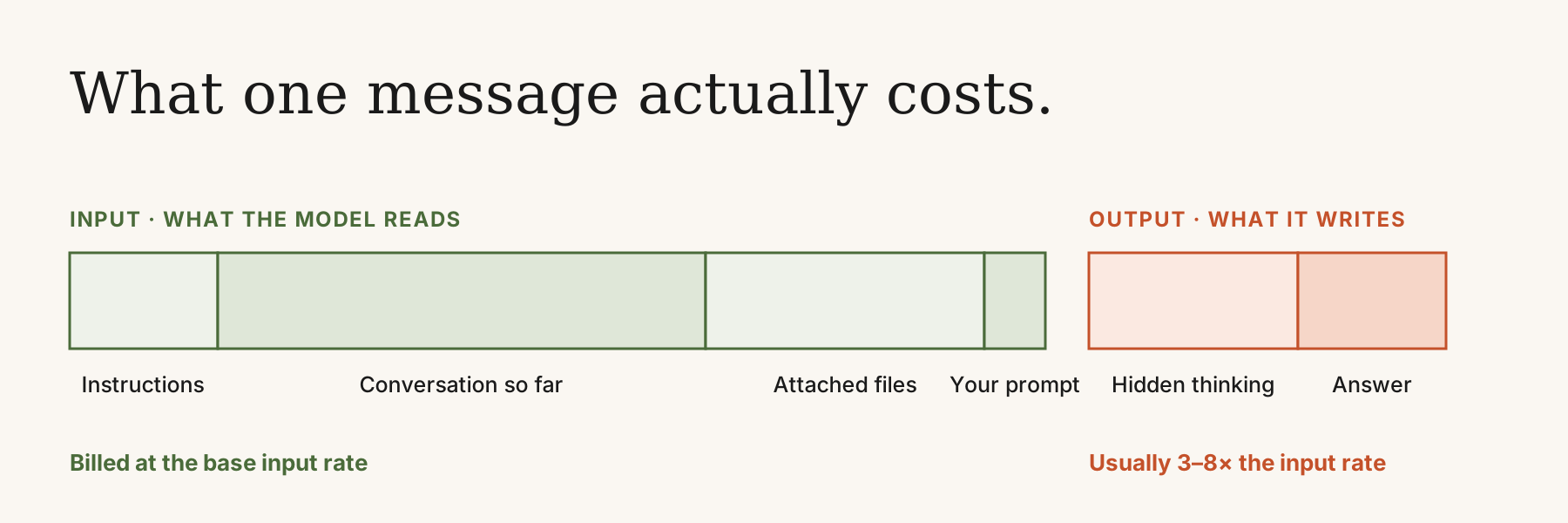
AI tools don’t charge by the message. They charge by the token, and a token is about three-quarters of a word. A 100-word prompt comes to roughly 130 tokens. Each time you hit send, you pay twice: once for what the model reads (input) and once for what it writes back (output).
The input side is bigger than most people expect. It isn’t just your latest prompt. The model also reads the entire conversation up to that point, every file you’ve attached, and whatever instructions the app adds behind the scenes. On the output side there’s a surprise too. Many models now think before they answer, and you pay for that thinking even though you never see it. Output is also the pricier half, usually somewhere between three and eight times the cost of input, depending on the model.
Then there’s the choice of model. The top models cost many times more per token than the lighter ones, and for a lot of everyday work you’d struggle to tell the answers apart.
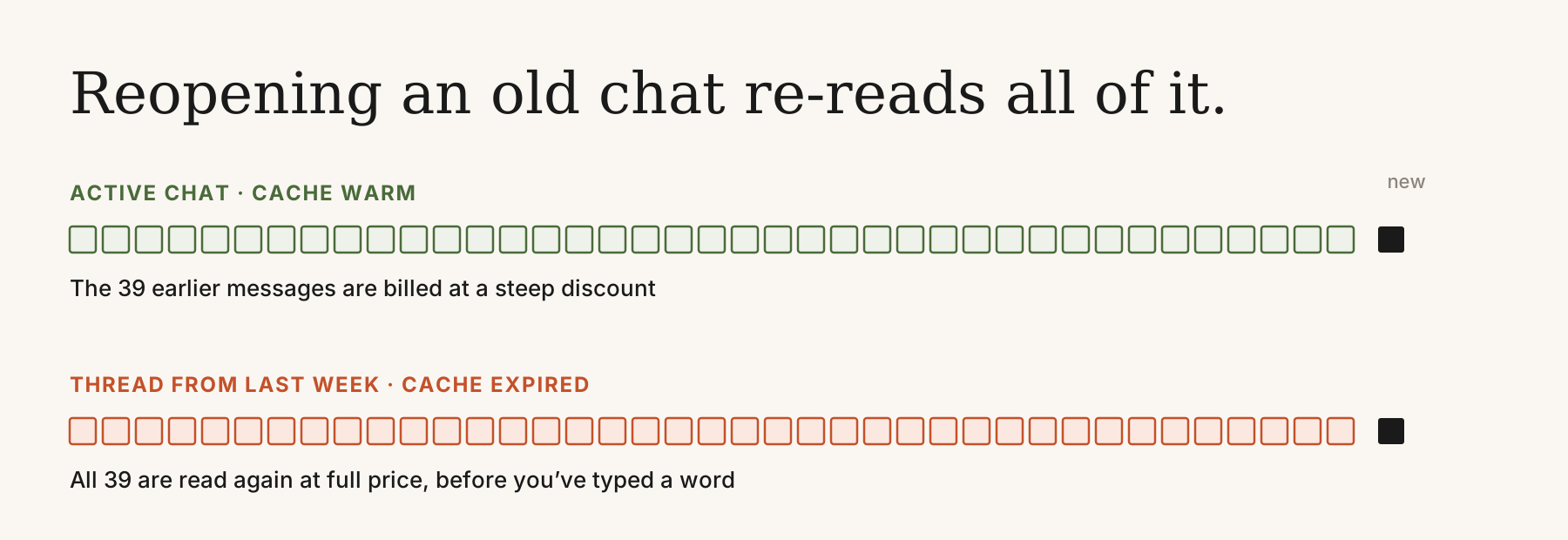
The cost most people never notice is the re-reading. The model goes back over the whole conversation every time you send a message. Most tools cache the parts it has already seen and bill them at a steep discount, but the cache only lasts a few minutes. Open a 40-message thread from last week and the model reads all 40 messages again at full price, before you’ve even started typing.
Why the Bills Keep Growing
Flat-fee AI is on its way out. For a while subscriptions hid what these models really cost to run, but as people use them more, the big platforms have been shifting to pay-for-what-you-use. ChatGPT Pro is now $200 a month. Claude Max is $100 or $200. GitHub Copilot shifted premium request model.
It’s worse for companies. Hand a team unlimited access with no way to see who’s using what, and a year’s budget can be gone in a few months, with nobody quite sure what it paid for. If you use these tools every day, it’s worth knowing where your tokens are going.
Eight Habits That Cut Your Token Bill
None of these will make your answers worse, and they work in whatever tool you happen to use.
1. Use the right model for the job
You wouldn’t ask your most senior engineer to rename a variable. Treat models the same way. Quick questions, rewording, simple lookups: the lighter model handles these fine, faster and for a fraction of the price. Keep the expensive model for work that genuinely needs it. Defaulting to the top model for everything is the most expensive habit on this list, and it’s also the most common.
2. Say exactly what you want
“Help me with my marketing strategy” gives the model nothing to aim at, so it covers everything. You read a long, general answer, narrow it down, ask again, then ask again. Compare that with “Write three subject lines for a reactivation email, each under ten words.” One message, one answer, done.
3. Set a length
If you don’t say how long, the model usually errs on the long side, and output is the expensive part. A few words fix it: “three bullet points”, “under 100 words”, “just the answer”. It adds up over a day, and a shorter answer is often the more useful one.
4. Start fresh instead of reopening old chats
Reopening a long, old conversation feels free, but it isn’t. The cache expired long ago, so the model reads the whole history again at full price. One user said they used 15% of their session limit just by reopening a thread. A better routine: before you finish for the day, ask for a short summary of where things stand. Tomorrow, paste it into a new chat and carry on.
5. Leave the start of the conversation alone
Caching only works while the beginning of the conversation stays exactly as it was, and only for a few minutes at a time. Go back and edit an early message, keep swapping files in and out, or leave it for an hour, and the discount is gone. Work in focused stretches and keep adding to the end.
6. Batch your questions
Every message makes the model reload the conversation. Three quick follow-ups means three reloads. If the questions are related, ask them together. You pay once, and the answers are often better because the model can see how they connect.
7. Switch extras on only when you need them
Extended thinking, web search and research modes make the model do more work than a simple question calls for, and you pay for all of it. Turn them on when the task needs them and off when it doesn’t. The same goes for attachments. A dense PDF page can run to 3,000 tokens, so if you only need five pages, don’t upload fifty.
8. Let memory carry the background
Claude has Projects and ChatGPT has Memory. Put the context you keep repeating in there once, instead of pasting it into every new chat. Look through it every so often, though. Stale information means paying tokens to correct it before the model gets to what you actually asked.
Keep an Eye on It
This isn’t something you fix once. Prices move, models change, and the rules around caching and limits change with them. What saved you money six months ago might not today. Glance at your usage dashboard now and then, and adjust your habits when the numbers drift.
Or Let the Tool Handle It
KodaCode builds these habits in, so you don’t have to think about them. It sends the model only what it needs to read. It lets you choose which model does which job, so routine work doesn’t run at top-tier prices. And it shows you what you’re spending and what you’ve saved as you work.